

VPN Router
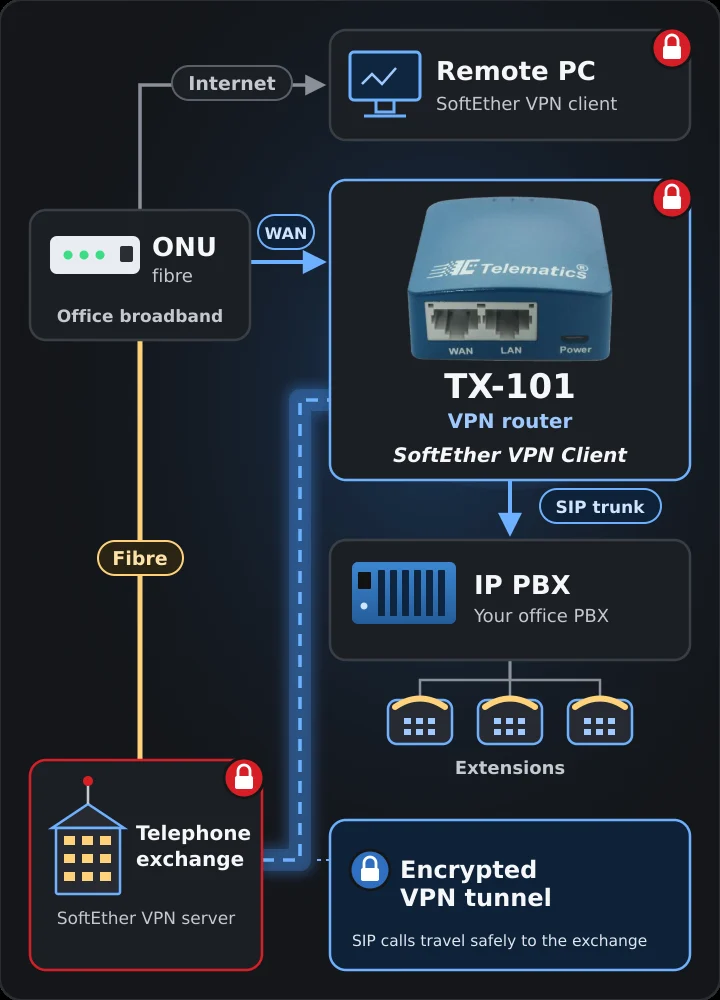
TX-101 is a pocket-sized Wi-Fi router with a built-in SoftEther VPN client. Connect it between your broadband and your IP PBX, and SIP trunk calls reach the exchange through an encrypted tunnel.
Secure SIP Trunk over the Internet
SoftEther VPN
A secure link, in the palm of your hand.
Calls and data sent over the open internet need protection. TX-101 builds that protection into a 40 grams router, so there is no PC or software to keep running at the site.
SoftEther VPN built in
The router runs the SoftEther VPN client itself and keeps an encrypted tunnel open to your VPN server.
Easy set-up screens
A customised web interface sets up WAN, LAN and Wi-Fi. No command line, no extra software.
Any internet source
Connect over Ethernet, as a Wi-Fi repeater, through a USB modem, or by tethering a phone.
Runs off a power bank
Power it from the adapter, or with the supplied cable from a laptop or power bank charger.
How it works
TX-101 sits between your broadband connection and your IP PBX. Everything that passes through it travels inside the VPN tunnel.
Connect to broadband
Plug the fibre ONU or modem into the TX-101 WAN port, or use Wi-Fi, a USB modem or a tethered phone.
Tunnel to the VPN server
TX-101 logs in to the SoftEther VPN server, for example at the exchange, and opens an encrypted tunnel.
Connect the IP PBX
Plug the IP PBX into the LAN port. Its SIP trunk now runs through the tunnel to the exchange.
A PC elsewhere can join the same VPN using the SoftEther VPN client software.
Technical specifications

| Product model | TX-101 |
|---|---|
| VPN | SoftEther VPN client |
| Ethernet ports | 1 × WAN, 1 × LAN, 10/100 Mbps |
| Other interfaces | 1 × USB 2.0, 1 × micro USB power, reset and toggle buttons, 3 LEDs |
| Wi-Fi | IEEE 802.11b/g/n, 300 Mbps (2.4 GHz), TX power <20 dBm |
| Antennas | Internal |
| CPU | MTK MT7628NN @ 580 MHz SoC |
| Memory / storage | DDR2 128 MB / NOR flash 16 MB |
| LEDs | Power / Wi-Fi |
| Power input | Micro USB, 5 V / 2 A |
| Power consumption | <2.75 W |
| Operating temperature | 0 to 40 °C (32 to 104 °F) |
| Storage temperature | −20 to 70 °C (−4 to 158 °F) |
| Dimensions / weight | 58 × 58 × 25 mm / 40 grams |
Four ways to get online
Use whichever internet connection the site has. The VPN tunnel works the same over all of them.
Ethernet
Cable from the fibre ONU, broadband modem or office network into the WAN port.
Repeater
Join an existing Wi-Fi network and share it on the LAN port and TX-101's own Wi-Fi.
USB modem
Plug a mobile data modem into the USB 2.0 port where there is no wired line.
Tethering
Use a mobile phone's data connection as the internet source.
System features
Small enough to carry in a pocket, with the memory to run a full VPN client.
The micro USB power port means TX-101 runs wherever there is a USB charger: the supplied adapter, a laptop or a power bank.
- SoftEther VPN client support
- Portable mini Wi-Fi router, 300 Mbps
- 128 MB RAM, 16 MB flash
- Customised set-up screens for WAN, LAN and Wi-Fi
- Powered by adapter, laptop or power bank
Where TX-101 is used
Wherever calls or data need to cross the internet safely.
IP PBX on a SIP trunk
Carry the SIP trunk from the exchange to the office IP PBX inside an encrypted tunnel.
Branch and site offices
Join a small office to the VPN with one plug-in box instead of a PC running VPN software.
On the move
Light enough to travel with. Run it off a power bank with a USB modem or tethered phone.
Remote PCs
Laptops and desktops can join the same VPN with the SoftEther VPN client software.
Need an office telephone system too?
Telematics also makes the TCX200 modular PBX for offices, hospitals and hotels, with up to 8 exchange lines and 130 phones. Ask us which combination suits your site.
Download the brochure
TX-101 features and technical specifications (PDF).
Enquire about TX-101
Tell us how many sites you need to connect, what internet connection each has, and where your VPN server or IP PBX sits. We will come back with a price and set-up plan.