

FXO GatewayCO lines to Ethernet
GW-T04 / T08 bring your telephone exchange lines onto the IP network. Plug in 4 or 8 landlines and use them from an IP PBX, a SIP server or IP phones, with the same numbers.
Your landlines on the IP network
CO lines · FXO · SIP
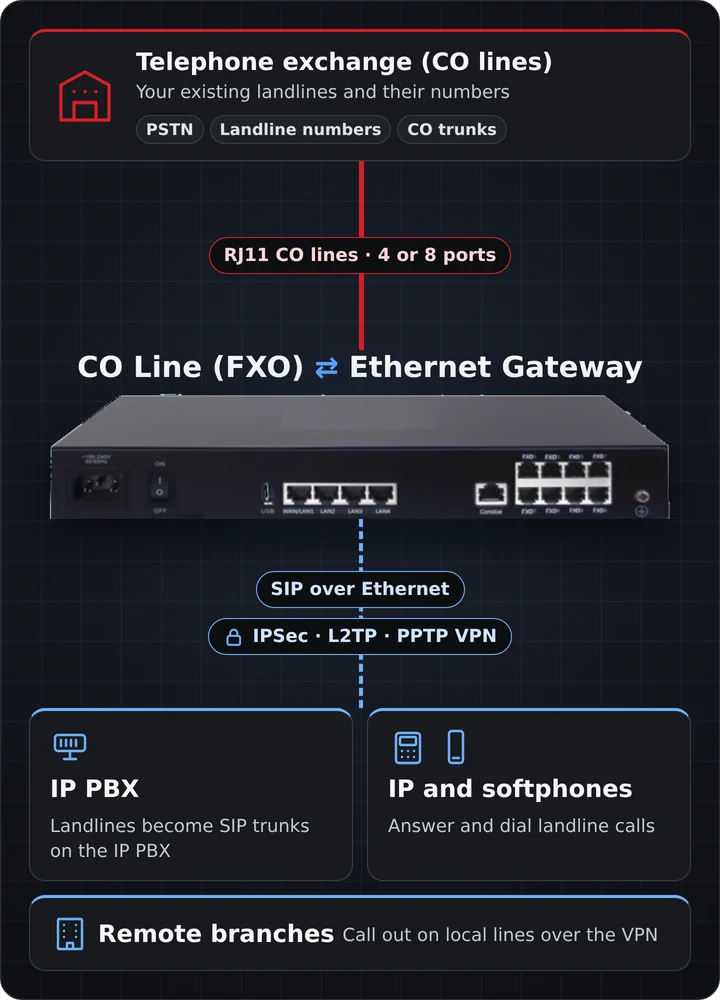
Keep the lines. Move the phone system to IP.
Many offices still have analog landlines with numbers their customers know. The FXO gateway turns each of those lines into a SIP line, so an IP PBX or IP phones can answer and dial out on them.
Your landline numbers
Existing CO lines stay with the operator. Callers dial the same numbers as before.
IP PBX and SIP servers
Standard SIP, compliant with the TISPAN / IMS standard. Also supports NGN and H.248 voice services.
Router, VPN and firewall
Routing, NAT, DHCP, QoS, VPN and firewall in the same box. Runs as a gateway, router or bridge.
Local and remote control
Web, HTTPS and SSH management on site; TR-069, SNMP and syslog for remote sites.
How it works
Each FXO port connects to one telephone line on one side and acts as a SIP line on the network side. The gateway converts the call in both directions.
Connect the CO lines
Plug each telephone line from the exchange into an FXO RJ11 port on the gateway.
Connect to the network
Plug the WAN/LAN1 port into the office LAN or broadband. Use static IP, DHCP or PPPoE.
Register with the IP PBX
Register the lines on your IP PBX or SIP server. Incoming landline calls ring on IP phones; outgoing calls leave on the landlines.
Branches linked over the built-in VPN can also call out on the lines at this site.
Choose by the number of lines
One FXO port connects one telephone line from the exchange. Pick the model that matches the number of landlines at your site.

GW-T04
4 × FXO · 4 × FE
Four CO lines for a small office, shop or clinic. Compact desktop unit that runs on a 12 V DC adapter.
Enquire about GW-T04
GW-T08
8 × FXO · 1 × GE + 3 × FE
Eight CO lines for a larger office or branch, with a Gigabit uplink and mains power.
Enquire about GW-T08Technical specifications
Both models run the same software. Voice, network, security and management features are identical.
| Specification | GW-T04 | GW-T08 |
|---|---|---|
| Telephony | ||
| FXO ports | 4 × RJ11 | 8 × RJ11 |
| Protocols | SIP (TISPAN / IMS compliant); IMS, NGN and H.248 voice services | |
| Codecs | G.711U, G.711A, G.729, G.729a, G.723, G.722 | |
| Interfaces | ||
| Network ports (RJ45) | 4 × FE | 1 × GE + 3 × FE |
| Console | 1 × RJ45, 115200 bps | |
| USB | 1 × USB 2.0, full speed | |
| Operation mode | Gateway, routing, bridge | |
| Physical | ||
| Input voltage | 12 V DC, 1 A | 110–240 V AC |
| Power consumption | 8 W | 5 W |
| Size | 23 × 14 × 3.3 cm | 34 × 21 × 4.4 cm |
| Operating temperature | −5 to 55 °C | |
| Humidity | Up to 95 % non-condensing | |
| Altitude / pressure | No loss of performance up to 3000 m; 86–106 kPa | |
| Air quality | Particle concentration below 180 mg/m³ | |
A closer look
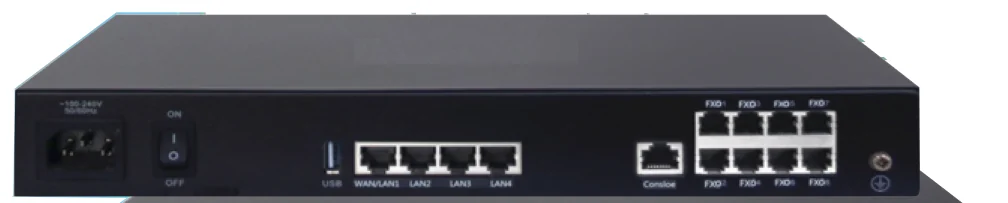
All connections on the rear panel: mains power and switch, USB, four network ports, console and the CO line ports.
Features
Common to GW-T04 and GW-T08.
Voice features
- Basic calling, hotline and abbreviated dialling
- Call forwarding: unconditional, on busy, on no answer
- Call waiting and call back on busy
- Three-party and conference calls
- Do not disturb (DND)
- Call permission settings
- Number identification (DNIS, CNIS) and DNIS limit
- Alarm clock (wake-up call) service
- IMS, NGN and H.248 voice services
Voice quality
- Codecs: G.711U, G.711A, G.729, G.729a, G.723, G.722
- Echo cancellation
- Silence detection and suppression
- Comfort noise generation
- Jitter buffer
- Voice packet loss compensation
- Gain adjustment
Network and routing
- Static IP, DHCP client and PPPoE
- WAN multi-sub-interface
- DHCP server, NAT, DNS, IGMP, VLAN
- Static, dynamic and policy routes
- Switch VLAN and trunk port
- NTP client
- Bandwidth control and QoS policy
- Gateway, routing and bridge modes
Security and VPN
- PPTP, L2TP, IPSec and SSL VPN
- Security firewall
- ARP attack defence
- DDoS defence
Management and logs
- Local HTTP web management
- Remote HTTPS web management
- SSH2 and console access
- Configuration backup and restore
- Factory default reset
- Software upgrade and remote update
- System reboot and debug tools
- Gateway status monitor
- SNMP, TR-069 and syslog
- Log viewing, remote syslog and log level settings
Where the FXO gateway is used
Wherever existing telephone lines need to work with an IP PBX, a SIP server or IP phones.
CO lines on an IP PBX
Connect the office's landlines to a new IP PBX as SIP lines.
Analog to IP migration
Replace an old exchange with an IP PBX without giving up the landlines.
Keep known numbers
Customers keep calling the numbers printed on letterheads and boards.
Branch offices
Link branches over the VPN and let each one call out on local lines.
IP and softphones
Staff answer and dial landline calls from IP phones and softphones.
Shops and clinics
A few landlines on one compact box, with the router and firewall built in.
Building the whole system?
Add analog extensions with the FXS gateway, bring operator SIP trunks to a PRI exchange with the SIP to E1 / PRI gateway, or secure remote sites with the TX-101 VPN router. Ask us which combination suits your site.
Download the brochure
FXS / FXO gateway features and technical specifications (PDF).
Enquire about the FXO gateway
Tell us how many landlines you have and which IP PBX, SIP server or IP phones should use them. We will come back with the right model, a price and an installation plan.