

Dual WAN VPN Router
TX-201 connects your office to two internet providers at once. If one line fails, it moves to the other in under a second. WireGuard links your branches, and the built-in SoftEther client carries your SIP trunk.
Two internet lines, one secure network
WireGuard + SoftEther VPN
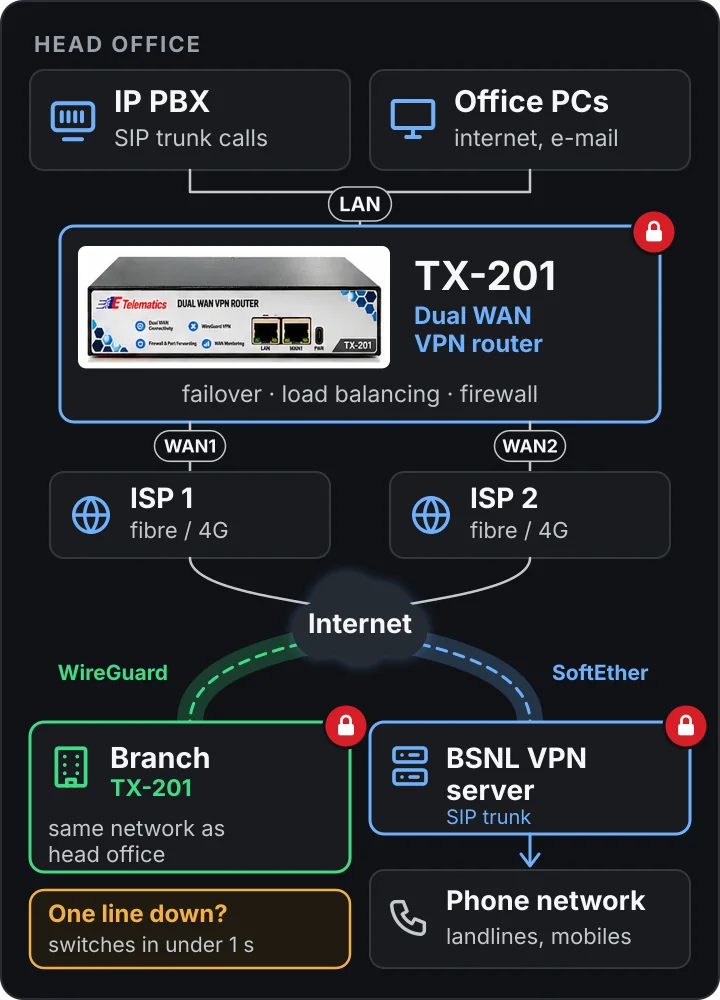
Two lines are better than one.
One internet line is a single point of failure for your calls, your branch links and your business. TX-201 runs two providers side by side, so work carries on when one of them doesn't.
Encrypted and protected
WireGuard and SoftEther tunnels, plus a built-in firewall and port forwarding for access control.
Automatic switch-over
When one line drops, traffic moves to the second line in under a second. No one has to touch a cable.
Gigabit, load balanced
Gigabit WAN and LAN ports, with traffic shared across both lines while both are up.
Wizard and dashboard
A set-up wizard and web dashboard, with remote management and live status for each line.
How it works
TX-201 sits between your two internet connections and your office network. It picks the best line, and keeps the VPN tunnels open on whichever line is up.
Connect two internet lines
Plug the first provider's ONU or modem into WAN1 on the front, and the second into WAN2 on the rear. Fibre, DSL or 4G.
Connect your office
Plug the LAN port into the office switch. The IP PBX, PCs and printers all sit behind TX-201.
Turn on the tunnels
WireGuard joins each branch TX-201. The SoftEther client logs in to the provider's VPN server and routes the SIP trunk through it.
Only office-to-office traffic and the SIP trunk travel in the tunnels. Websites and e-mail go straight out over whichever line is up.
Two VPNs, two jobs
Each tunnel carries only what it is meant to. Both reconnect on the other line if one goes down.
Head office ↔ branch
- One key pair per site
- Head-office and branch LANs work as one network
- Branch PCs and IP phones reach the head-office PBX
- Rides whichever line is up
TX-201 ↔ provider's VPN server
- SSL-VPN over TCP port 443
- Certificate and key login, one account per site
- Carries SIP signalling and RTP voice to the provider only
- Reconnects on the other line automatically
Technical specifications

| Product model | TX-201 |
|---|---|
| WAN ports | 2 × 10/100/1000 Mbps RJ45 (WAN1 front, WAN2 rear) |
| LAN port | 1 × 10/100/1000 Mbps RJ45 (front) |
| Dual WAN | Automatic failover and load balancing |
| Failover | Automatic, in under a second |
| VPN | WireGuard site-to-site, SoftEther VPN client |
| Security | Firewall and port forwarding |
| Monitoring | Real-time WAN link status and network health |
| Management | Set-up wizard, web dashboard, remote management |
| Power input | 1 × USB Type-C, 5 V DC / 3 A |
| Operating temperature | 0 to 50 °C (32 to 122 °F) |
Highlights
Failover, VPN and firewall in one box, managed from one dashboard.
Dual WAN connectivity
Two internet providers with automatic failover and load balancing.
Multi-branch networking
Secure, fast site-to-site links that keep your offices connected as one network.
Voice ready
Keeps the IP PBX and VoIP trunks working when an internet line fails.
Provider VPN support
Built-in SoftEther VPN client for service providers' VPNs, such as a BSNL SIP trunk.
Firewall and port forwarding
Network security and access control for everything behind the router.
WAN monitoring
Real-time status of each line and overall network health on the dashboard.
One box instead of three
Failover, VPN and firewall usually mean separate boxes, or a PC running VPN software. TX-201 does all three.
It is compact, runs off a USB Type-C supply, and is set up through a wizard and web dashboard, so a site can be brought online without a network specialist.
- Two gigabit WAN ports, one gigabit LAN port
- Failover in under a second, plus load balancing
- WireGuard site-to-site VPN
- Built-in SoftEther VPN client
- Firewall, port forwarding and WAN monitoring
- Set-up wizard, web dashboard, remote management
Where TX-201 is used
Anywhere the internet line must not become the weak link.
Single site, two providers
Uninterrupted internet and voice for one office.
Multi-branch businesses
Connect the head office and branches securely, as one network.
Offices with an IP PBX
Reliable VoIP and SIP trunks over two internet lines.
Business-critical sites
Always-on connectivity for clinics, retail outlets and warehouses.
Only one internet line, or need it portable?
The TX-101 SoftEther VPN router weighs 40 grams, has Wi-Fi and runs off a power bank. For the phone system itself, see the TCX200 modular PBX. Ask us which combination suits your site.
Download the brochure
TX-201 features and technical specifications (PDF).
Enquire about TX-201
Tell us how many sites you need to connect, which two internet providers each site has, and whether you use an IP PBX or provider SIP trunk. We will come back with a price and set-up plan.